Nearly 10% of all workplace fatalities in manufacturing stem from uncontrolled energy release. A properly executed lockout/tagout (LOTO) program is the frontline defense—but it only works when documented correctly. At the heart of every reliable program? The lockout tagout forms PDF: standardized, accessible, and legally defensible.
These forms aren’t just paperwork—they’re procedural safeguards. Whether you’re overseeing maintenance in a food processing plant or servicing electrical panels in a warehouse, a clear, printable PDF form ensures consistency, accountability, and OSHA compliance.
Let’s break down what makes an effective LOTO form, where to get reliable templates, and how to integrate them into real workflows.
Why Lockout Tagout Forms PDF Matter Beyond Compliance
A lockout tagout form PDF is more than a checklist. It’s a legal record of control.
When a machine is shut down for servicing, energy sources—electrical, hydraulic, pneumatic, chemical—must be isolated. Without documentation, there’s no audit trail. That’s where the LOTO form comes in.
A well-designed PDF form: - Records who locked out equipment - Identifies energy sources isolated - Notes time of lockout and release - Requires verification by authorized personnel - Serves as evidence during OSHA inspections
Real-World Example: At a Midwest packaging facility, an employee bypassed a lock because no form was required. The machine cycled unexpectedly. Result: a crushed hand. Post-incident, OSHA cited the lack of documented procedures. A simple PDF form could have prevented both the injury and the $92,000 fine.
Essential Elements of a High-Functioning LOTO Form PDF
Not all templates are created equal. A compliant and useful form includes:
1. Equipment Identification Clear fields for machine name, ID number, location. Avoid vague labels like “conveyor” — use “Conveyor Line 3, Packaging Room B.”
2. Authorized Employee Details Name, signature, contact. This creates individual accountability.
3. Energy Source Breakdown A checklist of all applicable energy types:
- Electrical
- Hydraulic
- Pneumatic
- Mechanical
- Chemical
- Thermal
Each should have a “verified isolated” checkbox.
4. Lock and Tag Inventory List lock numbers, tag IDs, and placement points. If multiple workers are involved, include a group lockout section.
5. Verification of Zero Energy A mandatory step: “Test for zero energy” with a supervisor’s initials. This is where many shortcuts happen.
6. Release Procedure Who can remove locks? When? Requires sign-off by the same authorized employee who applied them.
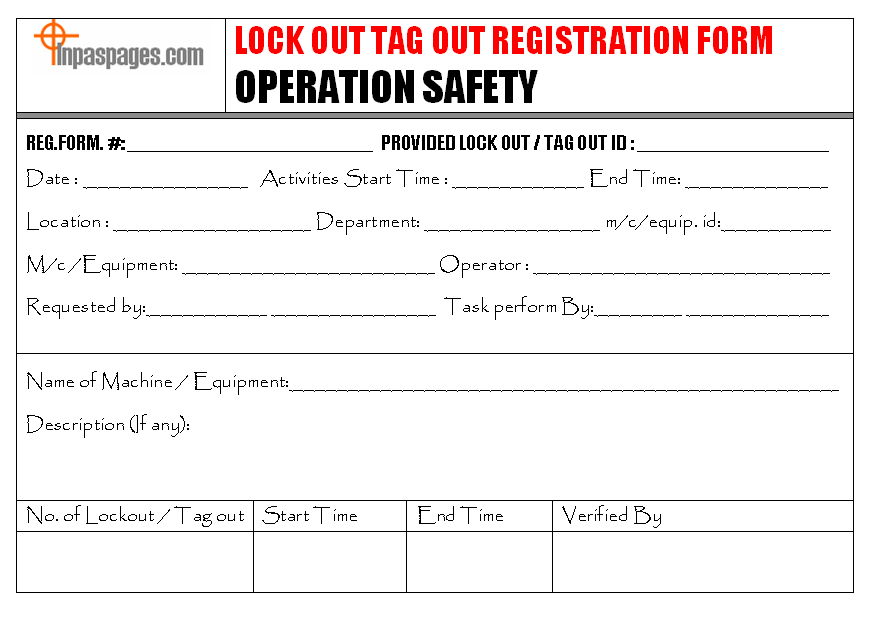
7. Date and Time Stamps Automatic or filled-in timestamps prevent backdating and confusion.
Common Mistake: Using a generic form that doesn’t match your equipment. A hydraulic press requires different isolation points than a boiler. Customize or select templates that reflect your risk profile.
Top 5 Free Lockout Tagout Forms PDF Templates
You don’t need to build from scratch. These trusted, downloadable PDFs are ready to use:
| Template Source | Key Features | Best For |
|---|---|---|
| OSHA.gov | Official, minimal design | Regulatory baseline |
| SafetyStore.com | Fillable PDF, multi-worker fields | Team-based environments |
| Creative Safety Supply | Visual layout, color-coded | Training-heavy teams |
| Justrite | Dual lockout/tagout tracking | High-risk industrial sites |
| SafetySkills | Interactive with digital signing | Hybrid paper/digital use |
Each of these can be downloaded, printed, or used digitally with a tablet or mobile device. Always verify that your version aligns with your internal LOTO policy.
Pro Tip: Keep a master folder of LOTO forms PDF by machine type. Label shared drives clearly: “LOTO Forms – CNC Machines” or “Boiler Systems – Lockout Logs.”
How to Customize Your Lockout Tagout Forms PDF
A one-size-fits-all form invites non-compliance. Tailor your template to your operations.
Start with: - Machine-specific isolation steps — add a section for unique hazards (e.g., residual pressure in reactors) - Site-specific approval chains — include supervisor or safety officer sign-off lines - Multilingual support — if your workforce uses Spanish, Tagalog, or Vietnamese, create translated versions
Example: A dairy plant uses ammonia refrigeration. Their LOTO form includes a special warning block: > “AMMONIA LINE ISOLATION: Verify double block and bleed. Confirm ventilation active before entry.”
Customization turns a generic PDF into a living safety document.
Integrating LOTO Forms PDF Into Daily Workflow
Even the best form fails if it’s not embedded in routine.
Step-by-Step Integration:
- Assign Form Custodians — Each shift has a safety lead who manages form distribution.
- Pre-Job Briefings — Review the LOTO form before any maintenance begins.
- Centralized Storage — Keep printed copies in lockboxes near high-risk machines. Also store digital versions on shared drives.
- Audit Trail — File completed forms for at least one year. Scan and archive if required.
- Refresher Training — Quarterly drills using actual forms and mock scenarios.
Pitfall to Avoid: Digital-only forms on tablets without backup. If the tablet dies, the procedure halts. Always have print-on-demand capability.

Common Gaps in Lockout Tagout PDF Usage Many companies think they’re compliant—until an audit.
1. Incomplete Sign-Offs Forms missing verifier initials are legally void. Train teams that no signature = no work.
2. Recycled Forms Reusing a form without updating details defeats the purpose. Each job requires a new form.
3. No Training Records Linked The LOTO form should reference the employee’s last training date. Add a field: “Last LOTO training: [Date].”
4. Ignoring Stored Energy A PDF that doesn’t prompt bleed-off checks is dangerous. Include explicit reminders: “Relieve all stored energy before verification.”
5. Offline-Only Access If safety officers can’t pull up a form during an inspection, you’re at risk. Use cloud-synced PDFs with access controls.
Making the Shift from Paper to Digital (Without Losing Compliance)
More companies are moving to digital LOTO systems—but PDFs still dominate for good reason.
Advantages of PDF: - Universal compatibility - Printable anywhere - No login or app required - Easy to archive
But digital tools add value: - Time-stamped entries - Automated reminders - Integration with CMMS
Hybrid Approach: Use fillable PDFs on tablets. At shift end, sync to a secure folder. Retain the simplicity of PDFs while gaining traceability.
Avoid flashy apps that require internet in remote areas. A robust PDF with digital signature fields often strikes the best balance.
Where to Download Reliable Lockout Tagout Forms PDF
Stick to authoritative sources:
- OSHA’s Website — Free, compliant, basic structure
- ANSI Z244.1-2023 Aligned Templates — For advanced programs
- Industry Associations — NFPA, NSC, and AIHA offer sector-specific forms
- Reputable Safety Suppliers — Grainger, Brady, and Master Lock provide downloadable forms with product integration
Avoid random blog sites offering “free LOTO templates.” Many lack up-to-date regulatory references.
Red Flag: A template without a revision date or source attribution should be discarded.
Final Thoughts: Treat Your LOTO Form PDF as a Living Document
A lockout tagout forms PDF isn’t a box to check—it’s a cornerstone of operational safety. The best forms are clear, machine-specific, and part of a culture that values documentation as much as action.
Start today: download a template, customize it for one high-risk machine, train your team, and run a mock drill. Then scale.
Because when energy control fails, it’s not just OSHA that shows up—it’s ambulances, lawyers, and grieving families.
Make your LOTO form PDF more than a file. Make it a standard.
Frequently Asked Questions
What should a lockout tagout form include? A complete LOTO form includes equipment ID, authorized employee details, energy sources isolated, lock/tag numbers, verification of zero energy, and release authorization.
Are free LOTO forms PDF OSHA-compliant? Many free templates meet OSHA 1910.147 requirements, but you must customize them to your site and validate them internally.
Can I use a digital LOTO form instead of paper? Yes, if it’s secure, tamper-proof, and accessible. Fillable PDFs with digital signatures are widely accepted.
How long should I keep completed LOTO forms? Retain records for at least one year, or longer if required by internal policy or past incidents.
Do all employees need to sign the LOTO form? Only authorized employees who apply locks must sign. Affected employees may acknowledge awareness, but don’t sign the control form.
Can I modify a PDF LOTO form after it’s filled out? No. Completed forms are legal documents. Any changes invalidate the record. Use a new form for corrections.
Where should LOTO forms be stored? Keep them accessible near equipment or in digital systems with backup. Completed forms should be archived securely.
FAQ
What should you look for in Lockout Tagout Forms PDF: Free Templates & Best Practices? Focus on relevance, practical value, and how well the solution matches real user intent.
Is Lockout Tagout Forms PDF: Free Templates & Best Practices suitable for beginners? That depends on the workflow, but a clear step-by-step approach usually makes it easier to start.
How do you compare options around Lockout Tagout Forms PDF: Free Templates & Best Practices? Compare features, trust signals, limitations, pricing, and ease of implementation.
What mistakes should you avoid? Avoid generic choices, weak validation, and decisions based only on marketing claims.
What is the next best step? Shortlist the most relevant options, validate them quickly, and refine from real-world results.